Classroom & live online19 courses26 softwareVerifiable certificate
CS/IT Courses
Enroll in online and Offline CS, IT courses to learn that will enhance your career. Courses include C, Java,C++, .NET, PHP, Python, Java, Ruby on rails…
Associate→Professional
CS/IT courses
The enrollable courses of this field, level by level.
Associate Course18 courses+
Associate Course in Programming Using Python
60 Hours · 1 software
BCC - Basic Computer CourseMOS: Microsoft Office Word AssociateMOS: Microsoft Office PowerPoint AssociateMOS: Microsoft Office Excel AssociateMOS: Microsoft Office Excel Expert+4
CCC Plus - Course on Computer Concepts PlusMOS: Microsoft Office Word AssociateMOS: Microsoft Office PowerPoint AssociateMOS: Microsoft Office Excel AssociateO Level+2
Chapter-wise syllabus of every software taught in this field -- tap a software to open it.
CHM O Level13 chapters · 52 topics+
Basic ElectronicsVoltage, current and resistanceResistors, capacitors, diodes and transistorsUsing a multimeterSoldering and desoldering practice
Digital ElectronicsNumber systems and codesLogic gates and Boolean algebraFlip-flops, counters and registersMemory devices
PC Architecture and ComponentsBlock diagram of a computerTypes of computers and form factorsPorts, buses and expansion slotsCabinets and cooling
Motherboard, Processor and MemoryMotherboard layout and chipsetsProcessor types and socketsRAM types and installationUpgrading components
Storage DevicesHDD, SSD and NVMe drivesPartitioning and formattingMBR and GPTRAID basics and data backup
Power Supply and UPSSMPS working and testingUPS types and batteriesEarthing and electrical safetyPower-related faults
PC Assembly and BIOS SetupAssembling a desktop step by stepBIOS and UEFI settingsBoot order and POST beep codesDismantling and cleaning
Operating System InstallationInstalling Windows and LinuxDrivers and updatesDual boot setupImaging, backup and recovery tools
Peripherals and PrintersMonitors and display problemsInkjet, laser and dot matrix printersScanners and multifunction devicesKeyboards, mice and webcams
Laptop MaintenanceLaptop components and dismantlingReplacing keyboard, screen, battery and storageOverheating and charging faultsChip-level repair overview
Networking and CablingNetwork topologies and devicesCrimping and testing LAN cablesIP addressing and sharingRouter and Wi-Fi configuration
Troubleshooting and Virus RemovalSystematic troubleshooting methodBoot, display and no-power faultsMalware removal and antivirusData recovery basics
Practical Project and Exam PreparationComplete PC build and network setupFault-finding practical testsTheory mock testsNIELIT exam guidance
Computer Fundamentals and Operating SystemComputer organisation and componentsNumber systems and data representationOperating system conceptsWindows and Linux desktop and file management
Office Tools: Word ProcessingDocument creation and formattingTables, images and page layoutMail mergeTemplates and printing
Office Tools: Spreadsheets and PresentationsFormulas and functionsCharts, sorting and filteringPivot tablesPresentation design, animation and slide show
Internet, Networking and Digital ServicesNetwork types, topologies and devicesInternet, browsers and emaile-Governance and digital financial servicesCyber security and future skills overview
Web Design with HTMLHTML document structureText, lists, links and imagesTables and formsAudio, video and semantic HTML elements
CSS and Responsive DesignSelectors, colours and fontsBox model and layoutFlexbox and positioningMedia queries for mobile screens
JavaScript and Web PublishingVariables, operators and control statementsFunctions and eventsDOM manipulation and form validationWeb hosting and publishing a site
Python BasicsPython installation and IDLEData types, operators and expressionsInput and outputConditional statements and loops
Python Functions and Data StructuresFunctions, arguments and recursionStrings and string methodsLists, tuples, sets and dictionariesModules and packages
Python Files and NumPyReading and writing filesException handlingNumPy arrays and basic operationsProblem solving with algorithms and flowcharts
Internet of Things ConceptsIoT architecture and applicationsSensors and actuatorsIoT communication protocols overviewSmart home, agriculture and health examples
IoT Practicals with ArduinoArduino board and IDEDigital and analog input and outputInterfacing sensors, LEDs and motorsSimple IoT mini project
Practical ProjectChoosing a project topicWebsite or Python based project workProject report and presentation
Introduction to NudiWhat Nudi is and where it is usedInstalling Nudi and its fontsSwitching between Kannada and EnglishUsing Nudi with MS Word and other programs
Kannada Keyboard LayoutHome row and finger positionsVowels (swaragalu) on the keyboardConsonants (vyanjanagalu) on the keyboardVowel signs (gunitakshara)Numbers and punctuation
Ottakshara and Word PracticeTyping ottakshara (conjunct letters)Common words and sentencesCorrecting frequent typing errorsTyping names, addresses and dates
Speed and Office DocumentsTimed typing tests for speed and accuracyLetters, notices and applications in KannadaFormatting Kannada documents in MS WordTables and printing
Fonts, Unicode and Final TestNudi ASCII fonts and Unicode textConverting text between font encodingsSharing Kannada text in email and webFinal typing test and review
Computer FundamentalsParts of a computer: hardware and softwareInput, output and storage devicesOperating system basicsTyping practice and keyboard shortcutsComputer care and safety
Windows Operating SystemDesktop, taskbar and Start menuFiles, folders and File ExplorerSettings, apps and printersNotepad, Paint and other utilitiesCompressing and sharing files
MS WordTyping, editing and formatting textPage layout, headers, footers and page numbersTables, pictures and shapesMail Merge for lettersPrinting and saving as PDF
MS ExcelWorkbooks, worksheets and cell formattingFormulas and functions: SUM, AVERAGE, IF, COUNTIFVLOOKUP and XLOOKUPSorting, filtering and conditional formattingCharts and PivotTablesPrinting sheets
MS PowerPointSlides, layouts and themesPictures, charts and SmartArtTransitions and animationsPresenting a slide show
Internet, Email and Online ServicesWeb browsers and searchCreating and using emailCloud storage: Google Drive and OneDriveOnline forms, DigiLocker and digital paymentsCyber safety and avoiding online fraud
Accounting Basics and TallyPrime SetupAccounting terms and golden rulesCompany creation in TallyPrimeGroups and ledgersShortcut keys and navigation
TallyPrime Vouchers and InventoryContra, payment, receipt and journal vouchersSales, purchase, debit and credit notesStock groups, units and stock itemsGodowns and stock reports
GST and Reports in TallyGST setup, ledgers and tax ratesGST invoicesBank reconciliationTrial Balance, Profit & Loss and Balance SheetBackup and restore
Adobe Photoshop BasicsWorkspace, image size and resolutionLayers and selectionsCropping, straightening and colour correctionHealing, Clone Stamp and retouching
Photoshop Design WorkMasks and adjustment layersText and layer stylesPassport photos and photo cardsSocial media posts and postersSaving for print and web
CorelDRAW BasicsInterface, pages and toolsShapes, lines and the Shape toolColour, fill and outlineText, fonts and Text to PathWeld, trim, intersect and PowerClip
CorelDRAW for Print and DTPLogo designVisiting cards and letterheadsBrochures, flyers and bannersWedding cards and certificatesPrint settings and export to PDF
Final Projects and PortfolioOffice documentation projectAnnual accounts project in TallyGraphic design portfolioResume preparation and interview practice
Getting Started with MATLABMATLAB desktop: Command Window, Workspace, Current FolderVariables, data types and operatorsBuilt-in functions and help documentationLive Editor and scriptsSaving and loading data (.mat files)
Vectors, Matrices and ArraysCreating vectors and matricesIndexing and slicingMatrix operations vs element-wise operationsSpecial matrices: zeros, ones, eye, randConcatenation and reshaping
Programming BasicsRelational and logical operatorsif, elseif, else and switchfor and while loopsVectorisation instead of loopsDebugging with breakpoints
FunctionsUser-defined functions and function filesInput and output argumentsLocal and anonymous functionsScope of variablesError handling with try/catch
Data Visualisationplot, subplot and figure formattingLabels, legends, axes and gridBar, histogram, scatter and pie charts3D plots: mesh, surf and contourExporting figures for reports
Working with DataImporting Excel, CSV and text filesTables, cell arrays and structuresStrings and text processingMissing data and basic cleaningBasic statistics: mean, std, max, min
Numerical Methods and Engineering MathsSolving linear equationsPolynomials and curve fittingInterpolationNumerical integration and differentiationSolving ODEs with ode45
Introduction to Simulink and Mini ProjectSimulink library browser and blocksBuilding and running a simple modelScopes and signal viewingMini project: engineering data analysis or simulationCourse review and certificate assessment
ACC - Awareness in Computer Concepts8 chapters · 36 topics+
Knowing the ComputerWhat a computer is and where it is usedCPU, monitor, keyboard, mouse and printerInput, output and storage devicesHardware and softwareStarting and shutting down safely
Operating the ComputerDesktop, icons, taskbar and Start menuOpening, moving and closing windowsUsing the mouse and keyboardCreating files and foldersCopy, move, rename and delete
Typing and Word ProcessingKeyboard layout and typing practiceCreating and saving a documentEditing and formatting textBullets, simple tables and page setupPrinting a letter or application
Using the InternetWhat the internet is and how to connectWeb browser, address bar and tabsSearching with a search engineDownloading files and bookmarking pagesSafe browsing habits
Email CommunicationCreating a web email accountCompose, send, reply and forwardOpening and saving attachmentsContacts, folders and spamEmail safety and passwords
Digital Financial ServicesUPI apps and QR code paymentsMobile and internet banking basicsDebit cards, ATM and Aadhaar-enabled paymentsAvoiding OTP and phishing fraud
e-Governance ServicesWhat e-governance isDigiLocker and UMANGApplying online for government servicesOnline railway ticket and bill payment basics
Practice and AssessmentHands-on practice tasksRevision of all modulesPractical test and viva
Introduction to ComputersWhat is a computer and its usesComponents of a computer systemInput, output and storage devicesHardware, software and operating systemCare of the computer
Operating System and File ManagementDesktop, taskbar and Start menuWindows and dialog boxesFiles, folders and drivesCopy, move, search and delete filesSettings and shortcuts
Word ProcessingCreating and saving documents in LibreOffice Writer or MS WordText formatting and paragraph alignmentBullets, numbering and tablesPage setup, header and footerSpell check and printing letters
SpreadsheetsWorkbook, worksheet, rows, columns and cellsEntering and formatting dataBasic formulas and SUM, AVERAGE, MAX, MINSorting and filteringSimple charts and printing
PresentationsCreating slides and choosing layoutsAdding text, pictures and shapesThemes and slide designTransitions and simple animationRunning a slide show
Internet and the World Wide WebInternet and connection typesWeb browsers and websitesSearch engines and finding informationDownloads and bookmarksSafe browsing
Email, Social Media and Online CommunicationCreating and using an email accountAttachments, contacts and foldersSocial media basics and privacy settingsVideo calls and messaging appsOnline etiquette
Digital Financial Services and e-GovernanceUPI, mobile wallets and net bankingSafe online payments and fraud awarenessDigiLocker, UMANG and other citizen portalsOnline forms and applications
Practice and AssessmentPractical exercises on all modulesRevision and doubt clearingFinal practical test
CCC - Course on Computer Concepts10 chapters · 46 topics+
Introduction to ComputerComputer and its usesComponents: CPU, memory, input and output devicesStorage devices and units of memoryHardware, software and types of softwareNumber systems overview
Introduction to Operating SystemFunctions of an operating systemGUI desktop, panels and menusFile manager: files, folders and drivesSettings, users and software installationLinux and Windows basics
Word Processing with LibreOffice WriterCreating, saving and opening documentsText and paragraph formattingTables, images and page layoutHeader, footer and page numbersMail merge and printing
Spreadsheets with LibreOffice CalcCells, rows, columns and sheetsFormulas and built-in functionsSorting, filtering and conditional formattingChartsPrinting and page setup
Presentations with LibreOffice ImpressCreating slides and layoutsText, images, tables and charts on slidesMaster slides and templatesTransitions and animationSlide show and printing handouts
Introduction to Internet and WWWInternet basics and connection typesWeb browsers, URLs and search enginesDownloading and uploadingOnline forms and cloud storageSafe browsing
E-mail, Social Networking and e-GovernanceCreating and using email accountsAttachments, contacts and email etiquetteSocial networking and messaginge-Governance services: DigiLocker, UMANG, online applications
Digital Financial Tools and ApplicationsUPI, BHIM and QR code paymentsMobile wallets and internet bankingAePS, RuPay and USSD bankingSafe digital transactions
Future Skills and Cyber SecurityArtificial intelligence, IoT, cloud and big data overviewBlockchain, 3D printing and other emerging techCyber threats: malware, phishing and fraudStrong passwords, antivirus and safe practices
Practice Tests and Exam PreparationChapter-wise MCQ practicePractical exercisesMock tests in exam formatRevision and doubt clearing
CCC Plus - Course on Computer Concepts Plus12 chapters · 54 topics+
Computer FundamentalsComputer generations and typesHardware components and peripheralsMemory, storage and unitsSystem and application softwareNumber systems and data representation
Operating Systems and File ManagementWindows and Linux desktopsFile managers, paths and drivesUser accounts and permissionsInstalling and removing softwareCompression, backup and printers
Word Processing EssentialsCreating and formatting documentsTables, images and shapesPage layout, sections, header and footerFind and replace, spell check and AutoCorrect
Advanced Word ProcessingStyles and templatesTable of contents, index and footnotesMail merge for letters and labelsTrack changes and commentsExport to PDF
Spreadsheets EssentialsData entry and cell formattingFormulas, relative and absolute referencesCommon functions: SUM, IF, COUNTIF, ROUNDCharts and printing
Advanced SpreadsheetsLookup functions: VLOOKUP and HLOOKUPSorting, AutoFilter and Standard FilterData validation and conditional formattingPivot tablesGoal Seek and scenarios
PresentationsSlide layouts and master slidesTables, charts and SmartArt-style diagramsAudio, video and hyperlinksAnimations, transitions and rehearsed timingPresenter view and handouts
Database BasicsDatabase concepts: table, record, field, keyCreating tables and relationshipsQueries with criteriaForms and reports
Internet, Email and Cloud CollaborationNetworking basics and internet connectionsBrowsers, search techniques and bookmarksEmail, calendar and contactsCloud storage and shared documentsVideo conferencing tools
e-Governance and Digital Financial ServicesCitizen portals: DigiLocker, UMANG and othersOnline applications and grievance portalsUPI, net banking and AePSSafe digital payments
Cyber Security and Future SkillsMalware, phishing and social engineeringPasswords, two-factor authentication and backupsData privacy basicsAI, IoT, cloud, big data and blockchain overview
Project Work and Exam PreparationOffice document and spreadsheet projectPractical exercises on all modulesMCQ mock testsRevision and doubt clearing
Computer FundamentalsTypes and uses of computersHardware and softwareMemory and storage unitsNumber systems basicsComputer safety and ergonomics
Computer HardwareMotherboard, processor and RAMHDD, SSD and optical drivesSMPS and UPSPorts, cables and expansion cardsAssembling and dismantling a PC
BIOS, OS Installation and MaintenanceBIOS and UEFI setupDisk partitioning and formattingInstalling Windows and LinuxDrivers and software installationBackup, restore and system updates
Troubleshooting and Preventive MaintenanceBoot and startup problemsCommon hardware faults and diagnosisVirus removal and antivirus toolsPrinter and peripheral troubleshootingPreventive maintenance routine
Networking BasicsLAN, WAN and Wi-FiIP addressing and DHCP basicsRouter and switch setupSharing files and printersNetwork troubleshooting commands
Word ProcessingDocument creation and formattingTables, images and page layoutMail mergeTemplates and stylesPrinting and PDF export
SpreadsheetsData entry and formattingFormulas and functionsSorting, filtering and validationCharts and pivot tablesPrinting reports
PresentationsSlide design and layoutsImages, charts and multimediaAnimations and transitionsDelivering a presentation
Office Productivity ToolsPDF tools and scanningEmail clients, calendar and contactsCloud storage and file sharingTyping speed and shortcutsVideo conferencing
Internet, e-Governance and Digital PaymentsWeb browsing and search skillsOnline forms and citizen portalsDigiLocker, UMANG and online applicationsUPI, net banking and safe payments
Cyber Security and Safe ComputingMalware, phishing and online fraudPasswords and two-factor authenticationData backup and privacySafe use of social media
Communication Skills and Personality DevelopmentProfessional email writingSpoken communication and presentation skillsResume writingInterview preparationTeamwork and workplace etiquette
Project and AssessmentPC assembly and OS installation practicalOffice automation projectMock tests and revisionFinal practical and viva
Introduction to ComputersWhat a computer is and how it worksHardware, software and peripheralsInput, output and storage devicesSwitching on, logging in and shutting down safelyMouse and keyboard practice
Windows Operating SystemDesktop, Start menu and taskbarFiles and folders in File ExplorerCopy, move, rename and deleteSettings, display and printersNotepad, Paint, Calculator and Snipping Tool
Typing SkillsHome row and finger positionsTyping speed and accuracy practiceKeyboard shortcuts for faster workIntroduction to Hindi Unicode typing
MS Word: DocumentsCreating, saving and opening documentsFont, paragraph, bullets and numberingPage setup, margins and orientationFind and replace, spelling and grammarPrinting and saving as PDF
MS Word: Advanced FeaturesTables and table formattingPictures, shapes and WordArtHeaders, footers and page numbersMail Merge for letters and envelopesTemplates for resumes and applications
MS Excel: BasicsWorkbook, worksheet, rows, columns and cellsData entry, AutoFill and formattingBasic formulas and cell referencesSUM, AVERAGE, MIN, MAX and COUNTPrinting worksheets
MS Excel: Working with DataIF and COUNTIF functionsSorting and filteringConditional formattingCharts and graphsSimple mark sheets and expense sheets
MS PowerPointSlides, layouts and design themesText, pictures, tables and chartsSmartArt and shapesTransitions and animationsRunning and printing a presentation
Internet, Email and Digital ServicesWeb browsers, search engines and bookmarksCreating an email account and sending attachmentsGoogle Drive and OneDrive basicsOnline forms, DigiLocker and UPI paymentsVideo calls and online meetings
Cyber Safety and Practice ProjectStrong passwords and two-step verificationRecognising phishing and online fraudOffice documentation projectCourse revision and practical test
Basics to Start the C programming languageIntroduction about The C Programming LanguageFirst C program - Hello WorldSyntax and Errors in COutput in CComments in CRunning your Code using a Compiler.SummaryQuiz
Variables in CLet’s Start with VariablesVariables: Naming Standards in CData Types in Cprintf() in Clet's Practice Naming Standard, Data Types, and printf()Difference between Float and Double in CUpdating Variables Value in CConstants in CCasting Types in CSummaryQuizProject
Introduction to C++History and features of C++Setting up a compiler and IDE: g++, Code::Blocks or VS CodeStructure of a C++ programcin, cout and namespacesCompiling, running and debugging
Data Types, Variables and OperatorsBuilt-in data types and autoConstants and referencesArithmetic, relational and logical operatorsType conversion and casting
Control Statementsif, else if and switchfor, while and do-while loopsbreak, continue and nested loopsPattern and number programs
FunctionsFunction prototypes and definitionsCall by value and call by referenceDefault arguments and inline functionsFunction overloadingRecursion
Arrays, Strings and PointersOne- and two-dimensional arraysC-style strings and std::stringPointers and pointer arithmeticDynamic memory with new and deletePointers to objects and arrays
Classes and ObjectsClasses, objects and access specifiersConstructors, copy constructor and destructorThe this pointerStatic members and friend functionsEncapsulation and data hiding
Operator Overloading and Type ConversionOverloading unary and binary operatorsOverloading << and >> for I/OConversion between class and basic typesRules and good practice
Inheritance and PolymorphismSingle, multiple, multilevel and hierarchical inheritanceVirtual base classesVirtual functions and runtime polymorphismAbstract classes and pure virtual functionsVirtual destructors
Templates and Exception HandlingFunction templatesClass templatestry, catch and throwStandard exceptions and custom exception classes
File Handling and the STLifstream, ofstream and fstreamReading and writing text and binary filesSTL containers: vector, list, map and setIterators and STL algorithms
Mini ProjectProject planning with classesLibrary, bank or student management systemTesting and code reviewProject presentation
Introduction of Core java ProgrammingIntroduction to Java; features of JavaComparison with C and C++Download and install JDK/JRE (Environment variables set up)The JDK Directory StructureFirst Java Program through command promptFirst Java Program through Eclipse
Data types and OperatorsPrimitive Datatypes, Declarations, RangesVariable Names ConventionsNumeric Literals, Character LiteralsString LiteralsArrays(One dimensional; two- dimensional)Array of Object ReferencesAccessing arrays, manipulating arraysEnumerated Data TypesNon-Primitive DatatypesDefining a class, variable and method in JavaMethod Signature; method callsExpressions in Java; introduction to various operatorsAssignment OperatorArithmetic OperatorsRelational OperatorsLogical OperatorsConditional OperatorsOperator PrecedenceImplicit Type ConversionsUpcasting and downcastingStrict typingType conversion
Control Flow statementsStatements and it's various categories in Javaif, if-else, if-else-ifswitch casefor statement (both flavours traditional and enhanced for)while and do-while loopsThe continue Statement; labelled continue statementThe break Statement; labelled break statementreturn statement
OOPS and its application in JavaClasses and ObjectsDefining a class;Defining instance variables and methodsCreating objects out of a classMethod calls via object referencesAbstractionInterfaces and Abstract classesAbstract and non-abstract methodsInheritanceextends and implements keywords in JavaSuper class and Sub classthis keyword, super keyword in Java for inheritanceConcrete classes in JavaPolymorphismCompile time polymorphism -- Overloading of methodsRun time polymorphism -- Overriding of methodsMethod Overriding rules and method overloading rulesIntroduction to Object class and it's methodsEncapsulationProtection of dataJava Bean, POJOGetters/SettersMemory management in JavaHeapStack
PackagesNeed for packagesWhat are packages; package declaration in JavaImport statement in JavaHow do packages resolve name clashes?
MiscellaneousVar-ArgsReference variables, local variables, instance variablesMemory allocations to variablesDouble equals operator(==) operator for primitives and objectstoString() method on an object
StaticsStatic variables and methodsStatic importsStatic initialization blocks; instance intialization blocksStatic concept in inheritance
ConstructorsWhat are Constructors?Properties of ConstructorsDefault and Parameterized ConstructorsRules for constructor implementationConstructor Chainingthis call; super call for constructorsConstructors for Enumerated Data TypesConstructors concept for Abstract classes and interfaces
Exceptions in JavaWhat are Exceptions?Need for exceptionsHow can Exceptions be coded in Java?API heirarchy for ExceptionsTypes of ExceptionsKeywords in Exception API: try, catch, finally, throw, throwsRules for coding ExceptionsDeclaring ExceptionsDefining and Throwing ExceptionsErrors and Runtime ExceptionsCustom ExceptionAssertionsWhat are Assertions?Enabling and disabling assertions in development environment
Strings in JavaWhat are Strings?String heap memory and Constant Pool memoryImmutability in StringsString creation on heap and constant poolMethod APIs on String; operations on StringsMutability of String Objects - StringBuilder and StringBufferSplitting of Strings and StringTokenizer class
Collection Framework in JavaThe Collections FrameworkThe Set InterfaceSet Implementation ClassesThe List InterfaceList Implementation ClassesThe Map InterfaceMap Implementation ClassesQueue InterfaceQueue Implmentation classesUtility classesSorting collections using utility methodsequals() and hashCode contract in Java collectionsoverriding equals and hashCode methods in JavaNew Collections added in Java 1.6Primitive wrapper classes and all its method APIs
GenericsGenerics for CollectionsGenerics for classGenerics for methods
Input-Output in JavaWhat is a stream?Overview of StreamsBytes vs. CharactersOverview of the entire Java IO APIReading a file; writing to a file usinf various APIsReading User input from consolePrintWriter Class
SerializationObject SerializationSerializable InterfaceSerialization APIObjectInputStream and ObjectOutputTransient FieldsreadObject and writeObject
Threads in JavaNon-Threaded ApplicationsThreaded ApplicationsProcess based multitasking Vs Thread based multitaskingThread API in JavaCreating ThreadsStates of a ThreadSychronization for threads; static and non-static synchronized methods; blocks; concept of object and class locksCoordination between threads - wait, notify and notifyAll methods for inter-thread communication
AppletsWhat are applets?Need for AppletsDifferent ways of running an applet programApplet API heirarchyLife Cycle of an appletEven Handlers for applets, mouse events, click events
Swing GUIIntroduction to AWTIntroduction to Swing GUIAdvantages of Swing over AWTSwing APISwing GUI ComponentsEvent Handlers for SwingSample Calculator application using Swing GUI and Swing Event handling
JDBCWhat is JDBC; introductionJDBC featuresJDBC DriversSetting up a database annd cretaing a schemaWriting JDBC code to connect to DBCRUD Operations with JDBCStatement types in JDBCTypes of Rowset, ResultSet in JDBC
Access Modifers in JavaWhat are access modifiers?DefaultProtectedPrivatePublic
Debugging of Java Programs in Eclipse.Debugging of Java Programs in Eclipse.
Basics of a Web applicationWhat is a web application?What is a web client and web server?How do client and server communicate?HTTP protocol basicsHTML language basicsWhat is a TCP/IP port, URL?Need for a Web Container
Web Contaner and Web Application Project Set upTo set up Tomcat Container on a machineTo set up a Servlets JSP project in EclipseTo configure dependency of Servlet JSP APIsWeb application project struture
ServletsWhat are Servlets?What can they do? Why are they needed?How do Servlets look in code?HTTP Methods; GET, POST, PUT, DELETE, TRACE, OPTIONSGET/POST request; differences between the twoServlet LifecycleServlet Context and Servlet ConfigForwarding and Redirection of requests
Session ManagementWhat is a session?Why is it required?How to get a session?Session information passing between client and serverSesssion information passing mechanisms - Cookies, RewritingHow to destroy a session
JSPsIntroduction to JSP an dneed for JSPsBasic HTML tagsJSP Lifecycle
JSP ElementsScriptletsExpressionsDeclarationsSignificance of above elements and fitment into the JSP LifecycleWhat are Directives in JSP?Page DirectiveInclude DriectiveTaglib Directive
JSP Tag libraryJSP Standard ActionsExpression LanguageJSTL basics and it's usageNeed for Custom Tag LibraryCustom Tag Library implementation
Struts Framework (version 2.x)
Basics of MVCWhat is MVC?MVC Type1 and Type2 architectureWhy Struts framework?Struts 1 overviewStruts 1 and Struts 2 comparison
Struts 2 ArchitectutreArchitecture Diagram explanation of following components:Components of Model, Views and Controller in Struts FrameworkInterceptorsModel/Action classesValue StackOGNLIntroduction to configurations; framework and application architectureDeclarative and Annotations configuration approaches
Struts 2 set up and first Action classDownload JAR filesStruts 2 project build up and Configuration filesTo build Action classTo intercept an HTTP request via Struts2 framework using Action classDefining data and business logic in Action classPreparing and Forwarding control to Views
Struts 2 InterceptorsWhat are InterceptorsResponsibilities of an InterceptorMechanism of Interceptor calling in Struts 2Defining InterceptorsDefining Interceptor stacksDefining Custom Interceptors
Struts 2 Tag LibraryIntroduction to tag library of Struts 2 and it's usage
Struts 2 ValidationsValidations using Validateable interfaceWorkflow interceptor mechanism for validationsValidation Framework introduction and architectureValidating user input with above two mechanisms
Struts 2 Tiles FrameworksIntroduction to Tiles in a pageStruts2 Tiles framework introductionDefining tiles.xml fileConfiguring pages for tilesA complete Tiles example with Struts2
Hibernate Framework (version 3.x)
IntroductionWhat is ORM principle?Why ORM?ORM implementations
Hibernate ArchitectureIntroduction to HibernateHibernate ArchitectureWhat are Peristent classes?
Hibernate CRUDSetting up Hibernate projectConfiguring all JARs and XML filesSetting up connection to DB using HibernatePerforming basic CRUD operations using Hibernate APIObject Identity; Generator type classesUsing SQL with HibernateUsing HQLUsing Criteria queries
Mapping Collections and AssociationsTo define sets, mas, lists in HibernateAssociation Mappings: 1. One to one2 One to many3 Many to one4 Many to many
Hibernate CachingWhat is caching?What are the types of caching in Hibernate?Explanation of various caching mechanisms in Hibernate
Using Hibernate Annotations (if time permits)Sample example of using Hibernate Annotations
Spring Framework (version 3.x)
Introduction to springWhat is Spring?Spring Architecture explanation and all it's components
Introduction to all modules of springSpring Bean FactorySpring Application ContextSpring DISpring AOPSpring Integration; Spring messaging, Spring JMSSpring MVCSpring DAO
Setting up springSetting up of Spring frameworkDownload JARsConfigure XML files
Dependency InjectionWhat is Dependency Injection?How is it implemented using Spring Framework?Bean Wiring mechanisms in Spring
Spring AOPWhat is Spring AOP?Implementation of Spring AOP
IntrodutctionIntrodutction About PythonUnderstanding the Comments in PythonUnderstanding the Print in PythonString in PythonVariables in PythonErrors in PythonNumbers and Arithmetic Calculations in PythonChanging Numbers in PythonPerforming Exponentiation Method in PythonModulo Operator in PythonString Concatenation in PythonPlus-Equals Operator += in PythonMulti-line Strings in PythonAssessmentQuizProject: Graphic Design Technics Using with Block LettersProject: Creating Receipts for your CustomersAssign Variables with User InputSet up your environment
Working with Control FlowIntroduction to Control FlowBoolean ExpressionsRelational Operators in PythonBoolean Variables in PythonIf Statement in PythonRelational Operators with If Statement in PythonBoolean Operators - and in PythonBoolean Operators - or in PythonBoolean Operators - not in PythonElse Statements in PythonElse If StatementsChapter Review
Introduction to the Web and HTMLHow websites, browsers and servers workWhat HTML, CSS and JavaScript each doInstalling VS Code and useful extensionsYour first HTML pageUsing browser developer tools
HTML Document StructureDoctype, html, head and bodyMeta charset, viewport and titleElements, attributes and nestingComments and clean indentationValidating HTML
Text and ContentHeadings and paragraphsBold, italic, quotes and code textLine breaks and horizontal rulesSpecial characters and entitiesBlock and inline elements
Links, Images and MediaAbsolute and relative linksLinking within a page and opening new tabsImages, alt text and image formatsFigure and figcaptionAudio, video and iframe embeds
Lists and TablesOrdered, unordered and description listsNested lists for menusTable rows, headers and cellsColspan, rowspan and captionsWhen to use tables and when not to
Forms and InputsForm, label and input elementsText, email, password, number and date inputsRadio buttons, checkboxes and select menusTextarea and buttonsBuilt-in validation: required, pattern, min and max
Semantic HTML, Accessibility and SEOHeader, nav, main, section, article, aside, footerHeading hierarchy and document outlineAccessibility basics and ARIA labelsMeta description and Open Graph tagsFavicons and linking a stylesheet
HTML Project and PublishingPlanning a multi-page websiteBuilding a portfolio or business siteOrganising files and foldersPublishing on free static hostingFinal review and assessment
CSS BasicsInline, internal and external stylesheetsCSS syntax: rules, properties and valuesType, class, ID and attribute selectorsThe cascade, inheritance and specificityInspecting styles in browser dev tools
Colours, Units and TypographyColour formats: hex, rgb, hslAbsolute and relative units: px, em, rem, %, vw, vhFont families, Google Fonts and font loadingFont size, weight, line height and letter spacingText alignment, decoration and transform
The Box ModelContent, padding, border and marginbox-sizing: border-boxWidth, height, min and max sizesMargin collapsingOverflow, border radius and shadows
Backgrounds, Images and DisplayBackground colour, image, size and positionLinear and radial gradientsDisplay: block, inline, inline-block, noneObject-fit for imagesOpacity and visibility
Positioning and Advanced SelectorsStatic, relative, absolute, fixed and stickyz-index and stacking contextPseudo-classes: hover, focus, nth-childPseudo-elements: before and afterCombinators and selector grouping
Flexbox LayoutFlex container and flex itemsjustify-content, align-items and gapflex-grow, flex-shrink and flex-basisWrapping and orderingNavbars, cards and centring with Flexbox
CSS Grid LayoutGrid container, rows and columnsfr units, repeat and minmaxGrid areas and line placementAuto-fit and auto-fill for responsive gridsChoosing Grid or Flexbox
Responsive Web DesignViewport meta and mobile-first thinkingMedia queries and breakpointsFluid typography with clampResponsive images and layoutsTesting on device emulators
Transitions, Transforms and AnimationsTransition properties and timing functions2D and 3D transformsKeyframe animationsHover effects and micro-interactionsReduced-motion preferences
Modern CSS and ToolsCSS custom properties (variables)BEM naming and organising stylesheetsIntroduction to SassIntroduction to BootstrapLight and dark themes with variables
CSS ProjectConverting a design mock-up to a web pageBuilding a responsive landing pageCross-browser checks and fixesFinal review and assessment
Computer and Windows EssentialsComputer hardware, software and networksWindows desktop, File Explorer and settingsInstalling apps and managing printersData backup, compression and antivirus
Typing in English and HindiTouch typing techniqueEnglish typing speed practiceHindi Unicode typing with InScript keyboardTyping tests and accuracy improvement
MS Word: Professional DocumentsFormatting, styles and themesTables, pictures, shapes and SmartArtSections, columns and page breaksHeaders, footers and page numbersMail Merge
MS Word: Long Documents and ReviewTable of contents and captionsFootnotes, endnotes and referencesTrack Changes and commentsProtecting documentsTemplates and forms
MS Excel: Core SkillsFormatting, number formats and AutoFillRelative, absolute and mixed referencesMath, text and date functionsLogical functions: IF, AND, OR, IFERRORCharts and printing
MS Excel: Advanced AnalysisVLOOKUP, HLOOKUP, XLOOKUP and INDEX-MATCHSorting, filtering and Advanced FilterData Validation and drop-down listsConditional formatting and Excel TablesPivotTables and PivotChartsWhat-If Analysis and Goal Seek
MS PowerPoint: PresentationsSlide Master and themesImages, charts, tables and SmartArtAnimations, transitions and timingAudio, video and hyperlinksPresenter view and exporting as PDF or video
MS Access: DatabasesDatabase concepts, tables and fieldsPrimary keys and relationshipsQueries for searching and calculatingForms for data entryReports for printing
MS Outlook and Online CollaborationEmail accounts, folders and rulesCalendar, meetings and contactsOneDrive and Google Drive sharingOnline meetings and shared documents
Internet and Cyber SafetyWeb browsing and effective searchGovernment and banking online servicesDigital payments and UPI safetyPhishing, passwords and two-step verification
Accounting Basics and TallyPrimeAccounting terms and golden rulesCompany creation and F11 featuresGroups, ledgers and opening balancesShortcut keys and Gateway of Tally
TallyPrime Vouchers, Inventory and GSTContra, payment, receipt and journal vouchersSales and purchase with inventoryStock items, units and godownsGST setup and GST invoicesBank reconciliation
Tally Reports and Payroll BasicsDay Book, ledgers and outstanding reportsTrial Balance, Profit & Loss and Balance SheetPayroll basics: employees and pay headsBackup, restore and security
Final Office ProjectBusiness report in Word with data from ExcelExcel dashboard with PivotTablesComplete accounts of a trading firm in TallyPractical test and interview preparation
Foundation Papers (for students without O Level)IT tools and network basicsWeb designing and publishingProgramming and problem solving through PythonInternet of Things and its applications
Object-Oriented ProgrammingClasses, objects and constructorsInheritance and polymorphismTemplates and exception handlingFile handling in an object-oriented language such as C++
Data StructuresArrays, linked lists, stacks and queuesTrees, binary search trees and heapsGraphs and traversal algorithmsSearching, sorting and hashingTime and space complexity
Computer Organisation and Operating SystemCPU, memory hierarchy and I/O organisationData representation and instruction executionProcesses, threads and CPU schedulingMemory management and virtual memoryFile systems and Linux shell commands
Database TechnologiesER modelling and the relational modelNormalisationSQL: DDL, DML, joins and subqueriesViews, indexes and transactionsStored procedures and triggers basics
Systems Analysis, Design and TestingSDLC and process modelsRequirement gathering and feasibility studyStructured and object-oriented design with UMLTesting levels and test case designSoftware quality and maintenance
Specialised Area: Big Data Analytics using HadoopBig data concepts and the Hadoop ecosystemHDFS and MapReduceHive and Pig overviewSpecialised papers as per the current NIELIT scheme
Specialised Area: Data Science using PythonNumPy and pandasData cleaning and explorationVisualisation with MatplotlibStatistics for data analysisIntroduction to machine learning
Practicals and Mini ProjectPractical paper exercisesMini project planning and developmentProject documentation and review
Major ProjectProject selection in the specialised areaSystem analysis and design documentsDevelopment and testingProject report and viva preparation
NIELIT Exam PreparationPaper-wise practice questionsPractical exam practiceMock tests and revision
Foundation and Programming ConceptsProblem solving and algorithmsProgramming in CData structures reviewMathematical foundations
Object-Oriented Programming with C++ and JavaOOP principlesC++ classes, templates and STLJava classes, interfaces and packagesException handling and collections
Design and Analysis of AlgorithmsAsymptotic analysisDivide and conquer, greedy methodsDynamic programming and backtrackingGraph algorithmsNP-completeness basics
Database Management SystemsRelational model and SQLNormalisation and query optimisationTransactions and concurrency controlPL/SQL basicsNoSQL overview
Computer Architecture and Operating SystemsProcessor design and pipeliningMemory and I/O organisationProcess management and synchronisationDeadlocks, memory and file management
Computer Networks and SecurityNetwork layers and protocolsRouting and switchingWireless and mobile networksCryptography and network security
Software Engineering and Project ManagementSDLC and agile methodsUML modellingSoftware testing and qualityProject planning, estimation and risk management
Web and Mobile Application DevelopmentFront-end developmentServer-side programming and REST APIsDatabase-driven web applicationsMobile app development basics
Theory of Computation and Compiler BasicsFinite automata and regular expressionsContext-free grammarsTuring machinesPhases of a compiler
Electives and Emerging TechnologiesData science and machine learningArtificial intelligenceCloud computingElective subjects as per current NIELIT scheme
Major ProjectProblem identification and literature reviewSystem design and implementationTesting and deploymentProject report and viva
NIELIT Exam PreparationSubject-wise practice papersPractical and lab exam practiceMock tests and revision
Advanced AlgorithmsAmortised analysisAdvanced graph algorithmsRandomised and approximation algorithmsParallel algorithms
Advanced Computer ArchitectureInstruction-level parallelismMultiprocessors and multicore systemsMemory hierarchy designGPU and parallel processing concepts
Advanced Database SystemsQuery processing and optimisationDistributed databasesData warehousing and OLAPNoSQL and big data stores
Distributed and Cloud ComputingDistributed system modelsSynchronisation and consistencyVirtualisationCloud service models and architecture
Information and Network SecurityCryptographic algorithmsAuthentication and access controlNetwork attacks and defencesSecurity policies and audits
Software Project ManagementProject planning and estimationQuality managementRisk and configuration managementAgile project management
Research MethodologyResearch problem and literature reviewResearch design and experimentsData analysis and interpretationTechnical writing and publication ethics
Specialised ElectivesMachine learning and data miningInternet of ThingsImage processing and computer visionElectives as per current NIELIT scheme
DissertationTopic selection and proposalImplementation and experimentsThesis writingPresentation and viva voce
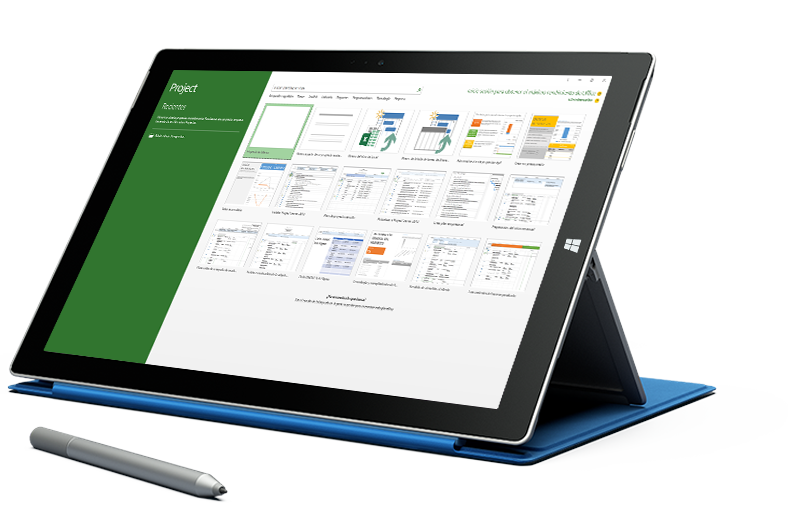
Getting Started Microsoft ProjectIntroduction of Microsoft Project and It's Release HistoryHow to download and install MSPWhat is Project Management & Understanding It's WorkflowExplore the Project user interfaceManage files and set options in the Backstage viewSetup A New Project FileEntering Project Properties And InformationUsing One Of The Project Template
Project TasksAdding tasks with durationOrganizing Tasks Into Logical GroupMoving, Deleting And Inserting New Task RowMaking A Task Inactive/ ActiveCreating MilestonesWorking with Task Duration and Estimated task DurationAdding Extra Notes And Attachment To TasksAdding The Project Summary TasksUsing Method Of Linking The TasksUnderstanding & Defining Different Task Link TypeAdding A Lag And Exploring Elapsed TypeSpell Check And Format The Task PaneFinding And Replacing Text In The Task Pane
Working with a Project FileNavigating To A Date Or TaskChanging The Date Zoom In The Gantt ChartShorting Project TasksFiltering Project Tasks And Filtering OptionHighlighting importance Project tasksGrouping Project task into logical groupAssigning Deadline constraintsExploring constraints typeInvestigating calendar and network diagram viewMaking use of the task inspectorDetermining the critical path
Resourcing Your ProjectUnderstanding the Resource Type AvailableAdding Resource in the ProjectAssigning Resource to TasksUnderstanding the Task Type and their Effect on Assigning Work ResourcesMultiple Resource Assignment to Multiple TaskAdding Fixed Costs to a ProjectUsing a Split View to Dig Deeper in to a ProjectOption for Dealing with Resource OverallocationAdding Overtime in to a TaskApplying resource leveling
The TimelineDisplay or Hide the Timeline and Add/Remove taskFilter Displayed Tasks and Use Callout TaskZoom and pan in or outEditing date and text formattingExporting the timeline to other program
Tracking and Managing Your ProjectMoving the Project Start Date and The Save BaselineChanging the Current Date and Format the Current Date LineUpdating Individual Task ProgressionUpdating Multiple Task ProgressionTracking Gantt View for Monitoring ProjectManually Splitting Tasks
Working with Calendar and Working TimeThe Working Time DefaultViewing and Amending the Standard CalendarAmending Work Resources CalendarCreating Recurring Absence PatternsCreating and Assigning a Custom CalendarAssigning a Calendar Directly to a TaskMaking Your Custom Calendar Available to Other Projects
Reporting Project InformationPrinting Setup for Gantt ChartChoosing One of The New Project ReportsCreating Your Own Chart ReportCreating New Report From NothingCopying Reports Between Projects and Deleting ReportsDeleting ReportExporting New Report to pdfUsing the visual Reports Export OptionExporting Project Data to Excel
Working with Multiple Project and Master ReportWhy Have Master Projects?Creating and Using the Master ProjectCreative Link Between Sub ProjectCreating a Resource PoolUsing the Resource in Multiple ProjectKeeping the Resource Pool Updated
Recurring task in actionRecurring task in actionEditing and removing recurring task
WBS (Work Breakdown System) CodeWhat is WBS?Creating and Using Your Own WBS Code
Global Template and Global SettingUnderstanding the Global Template and Using The organizerCreate and Customize Your Own Gantt Chart
Introduction to Power BIWhat business intelligence is and where Power BI fitsPower BI Desktop, Service and MobilePower BI Desktop interface: report, table and model viewsThe analyst workflow from data to dashboardBuilding a first quick report
Getting DataConnecting to Excel and CSV filesImporting a folder of filesConnecting to SQL Server and other databasesWeb and online data sourcesImport versus DirectQuery modesData source settings and privacy levels
Power Query: Cleaning and Shaping DataPower Query Editor and applied stepsData types, removing rows and columnsSplit, replace, trim and formatPivot and unpivotConditional and custom columnsColumn quality and data profiling
Power Query: Combining DataAppend queriesMerge queries and join typesGrouping and summarisingParameters and reusable queriesIntroduction to the M language
Data ModellingFact and dimension tablesStar schema designRelationships, cardinality and cross-filter directionCreating a date tableHierarchies and sort by columnHiding fields and organising the model
DAX FundamentalsCalculated columns versus measuresSUM, AVERAGE, COUNT and DISTINCTCOUNTRow context and filter contextCALCULATE with filtersFILTER, ALL and REMOVEFILTERSVariables in DAX
Advanced DAX and Time IntelligenceIterators: SUMX and AVERAGEXTOTALYTD, DATESYTD and SAMEPERIODLASTYEARMonth-on-month and year-on-year growthRANKX and Top N analysisDIVIDE and error handlingQuick measures
Visualisation and Report DesignBar, line, area, pie and combo chartsCards, tables and matricesMaps and geographic dataSlicers, filters and the filter paneConditional formatting and themesReport layout and design principles
Interactive ReportsDrill-down and drill-throughBookmarks and buttons for navigationReport page tooltipsEdit interactions between visualsMobile layout
Power BI Service: Publish and SharePublishing reports to a workspaceCreating dashboards and pinning visualsWorkspaces, roles and appsScheduled refresh and the on-premises data gatewayRow-level securitySharing, exporting and subscriptions
PL-300 Exam PreparationPL-300 skills outline and question typesReview of prepare, model, visualise and manage tasksPractice questions and case studiesTime management for case-study questionsMicrosoft Learn resources and exam booking process
Power BI Dashboard ProjectProject brief: sales, project or production datasetData cleaning and modellingDAX measures for key business figuresMulti-page interactive reportPublishing and dashboard presentation
Introduction to UI/UX and FigmaDifference between UI and UXWhere Figma fits in the design processFigma accounts, teams, projects and filesInterface: canvas, layers, toolbar and properties panelPages, frames and basic navigation
UX Research and WireframingUser research methods and interviewsPersonas and user journeysInformation architecture and user flowsLow-fidelity wireframesUsing FigJam for brainstorming and flows
Design Basics in FigmaShapes, boolean operations and masksPen tool and vector editingText, typography and type scaleColour, gradients and colour contrastImages, effects and blendingExport settings for icons and images
Frames, Layout Grids and ConstraintsDevice frames for mobile, tablet and desktopColumn, row and baseline gridsConstraints for resizingSpacing systems and alignmentGroups versus frames
Auto LayoutCreating auto layout framesPadding, spacing and alignmentHug, fill and fixed sizingNested auto layout for cards and listsResponsive buttons, forms and navigation barsWrap and absolute positioning
Components and VariantsMain components and instancesOverrides and swapping instancesVariants for states and sizesComponent properties: boolean, text and instance swapBuilding buttons, inputs and cards as componentsOrganising a component page
Styles and VariablesColour, text, effect and grid stylesVariables for colour, number and spacingModes for light and dark themesApplying variables across designsNaming conventions
PrototypingConnections, triggers and actionsTransitions and Smart AnimateOverlays, modals and dropdownsScrolling and fixed elementsInteractive componentsPresenting and sharing prototypes
Usability Testing and AccessibilityPlanning a simple usability testCollecting and acting on feedbackAccessibility basics: contrast, text size and touch targetsIterating designs after testingComments and collaboration in Figma
Design Systems and Developer HandoffStructure of a design systemPublishing and using team librariesDocumenting componentsDev Mode and inspect panelExporting assets and sharing specsUseful Figma plugins
UI/UX Case Study ProjectProject brief: mobile app or websiteResearch, personas and user flowsWireframes and high-fidelity screensComponents and interactive prototypePortfolio case study presentation
Introduction to CAD AutomationWhy automate AutoCAD workScripts, macros, AutoLISP, .NET and Python: an overviewCommand line, system variables and command behaviourWhere AutoLISP fits in AutoCADExamples of time-saving routines
Scripts, Action Recorder and MacrosWriting script (.scr) filesRunning scripts on single and multiple drawingsRecording and editing actions with the Action RecorderCommand macros in the CUI editorCustom ribbon buttons and tool palettes
AutoLISP BasicsSetting up the VS Code AutoLISP extensionLoading code with APPLOAD and the startup suiteacad.lsp and acaddoc.lspSyntax, parentheses and commentsDefining commands with defun c:Arithmetic and math functions
Variables, Strings and Listssetq and data typesString functions: strcat, substr, strlenConverting with rtos, atof, itoa and atoiCreating lists with list and conscar, cdr, nth, length and appendPoint lists and polar, distance and angle
User Input and the command Functiongetpoint, getdist, getreal and getintgetstring and getkwordRestricting input with initgetUsing the command functionSaving and restoring system variablesDrawing a parametric detail from user input
Conditions, Loops and Functionsif, progn and condComparison and logical operatorsrepeat and while loopsforeach and mapcar with lambdaLocal variables and user functionsError handling with *error*
Entity Selection and Dataentsel and nentselSelection sets with ssgetssget filters by layer, type and colourLooping through selection sets with ssname and sslengthEntity data lists and DXF group codesReading data with entget and assoc
Modifying and Creating EntitiesChanging entities with subst and entmodCreating entities with entmakeWorking with text and multiline textBlocks and attributesLayers and the tblsearch functionBatch changes across a drawing
DCL Dialog Boxes and File HandlingDCL file structure and tilesButtons, edit boxes, list boxes and togglesload_dialog, new_dialog and action_tileReading and writing text and CSV filesExporting drawing data to Excel through CSV
Introduction to Python for AutoCADHow Python connects to AutoCAD through COMSetting up Python with pywin32 or pyautocadDrawing lines, circles and text from PythonReading block and text data from a drawingProcessing DXF files with ezdxf
CAD Automation ProjectProject brief: a daily-use tool for your disciplinePlanning the routine and user inputWriting the AutoLISP code with a DCL dialogTesting, error handling and loading on startupDocumentation and demonstration
CADD Training Centre offers 19 CS/IT courses at Associate, Professional level: Associate Course in Programming Using Python, Associate Course in Office Automation, Associate Course in 'C' Language, Associate Course in 'C++' Language, Associate Course in JAVA Core, Associate Course in JAVA Advance, Associate Course in Awareness in Computer Concepts (ACC), Associate Course in Basic Computer Course (BCC)…
Which software will I learn in CS/IT?
CHM O Level, O Level, Nudi Typing, MS Office, Tally, Photoshop, CorelDRAW & Internet, MATLAB Fundamentals, ACC - Awareness in Computer Concepts, BCC - Basic Computer Course, CCC - Course on Computer Concepts, CCC Plus - Course on Computer Concepts Plus, ECC - Expert Computer Course, Office Automation Associate, C Language, C++ Language, Java Core…
How long are the CS/IT courses?
From 60 Hours for a short course; every course page lists its software and duration.
Can I learn CS/IT online?
Yes. Our centres run classroom batches and live online batches -- ask our counsellor for the next online batch.
Will I get a certificate?
Yes. After the course exam you get a CADD Training Centre certificate that anyone can verify online.

 CHM O Level
 O Level
 Nudi Typing
 MS Office, Tally, Photoshop, CorelDRAW & Internet
 MATLAB Fundamentals
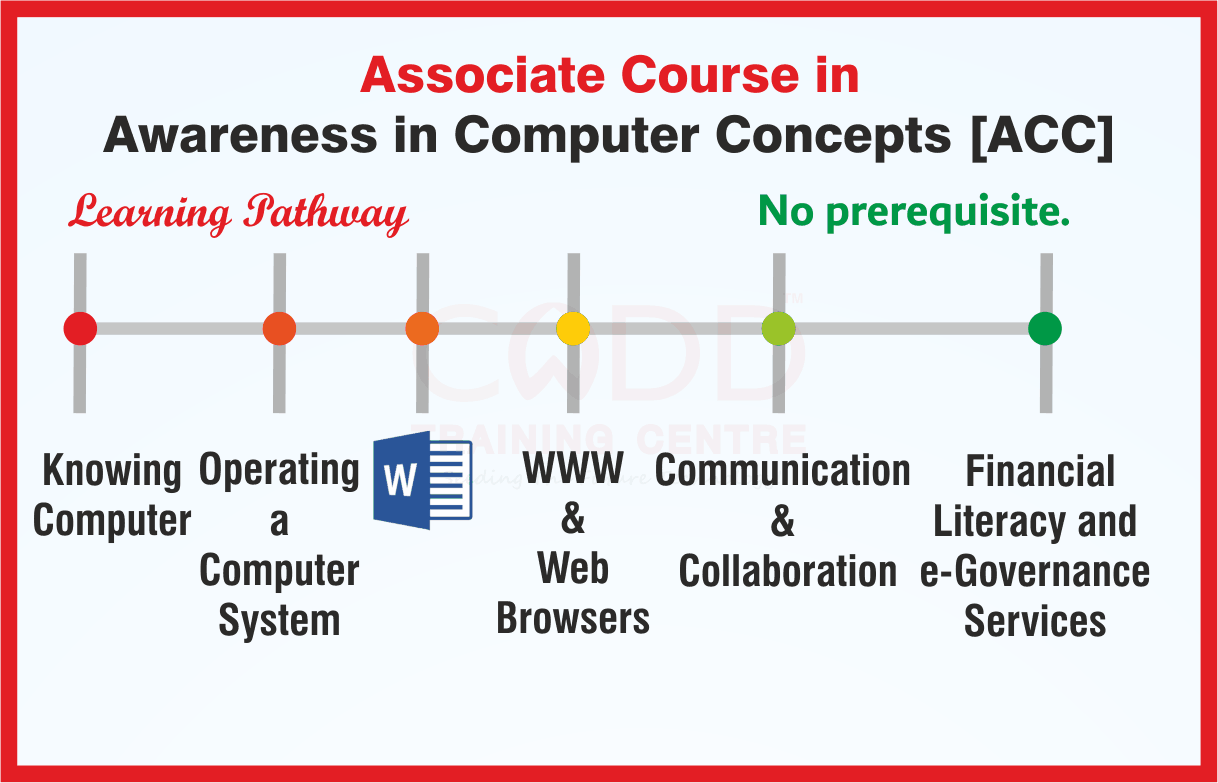 ACC - Awareness in Computer Concepts
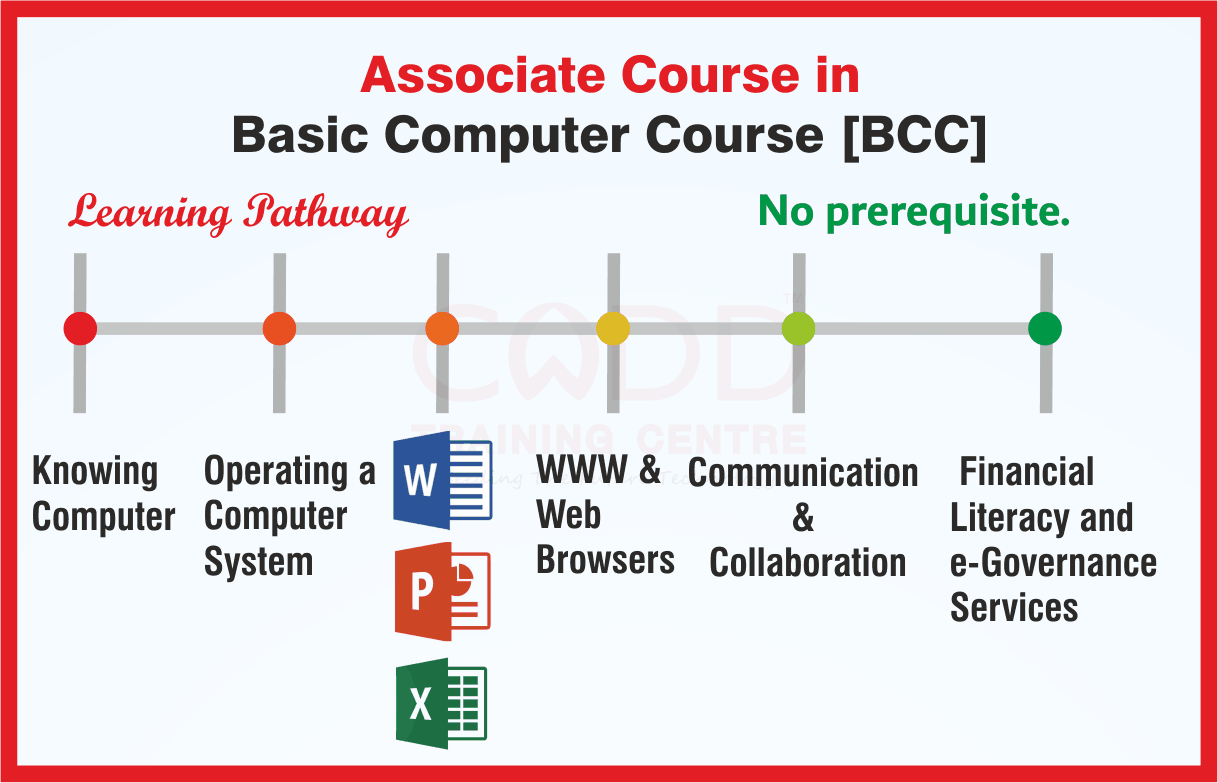 BCC - Basic Computer Course
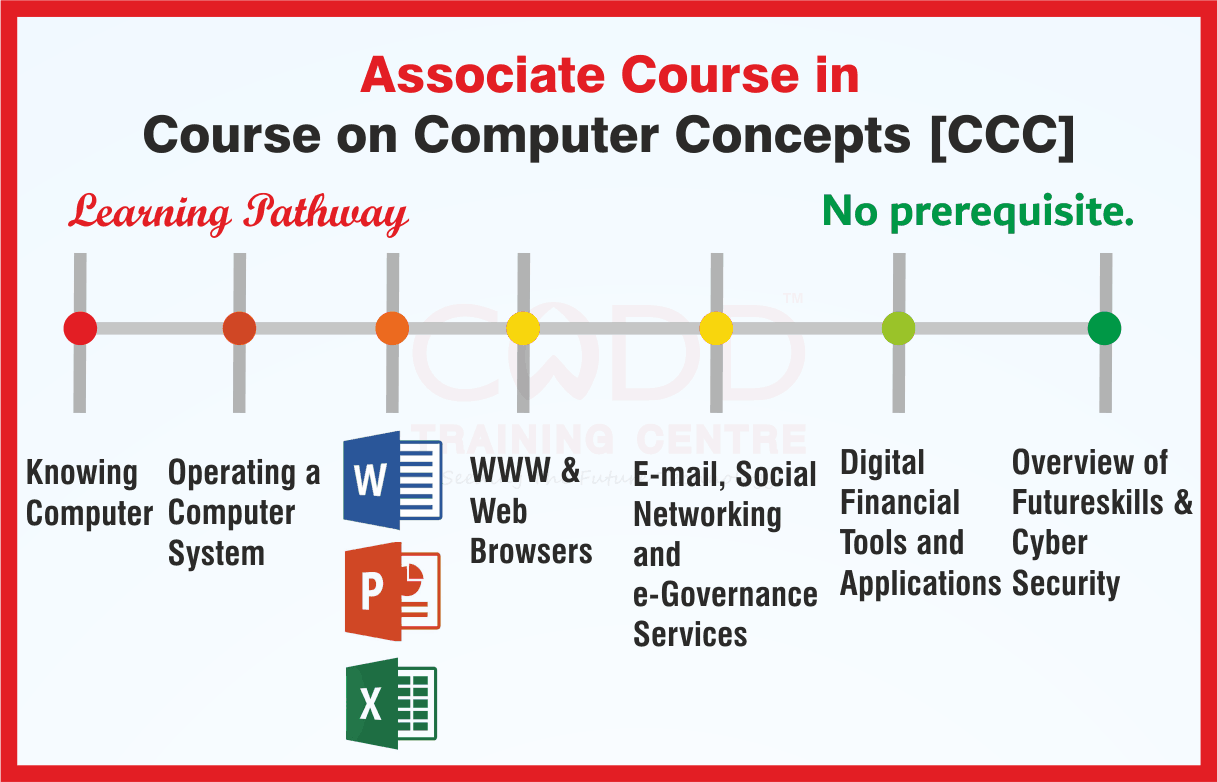 CCC - Course on Computer Concepts
_101021015903015305.png) CCC Plus - Course on Computer Concepts Plus
_101021021515778137.png) ECC - Expert Computer Course
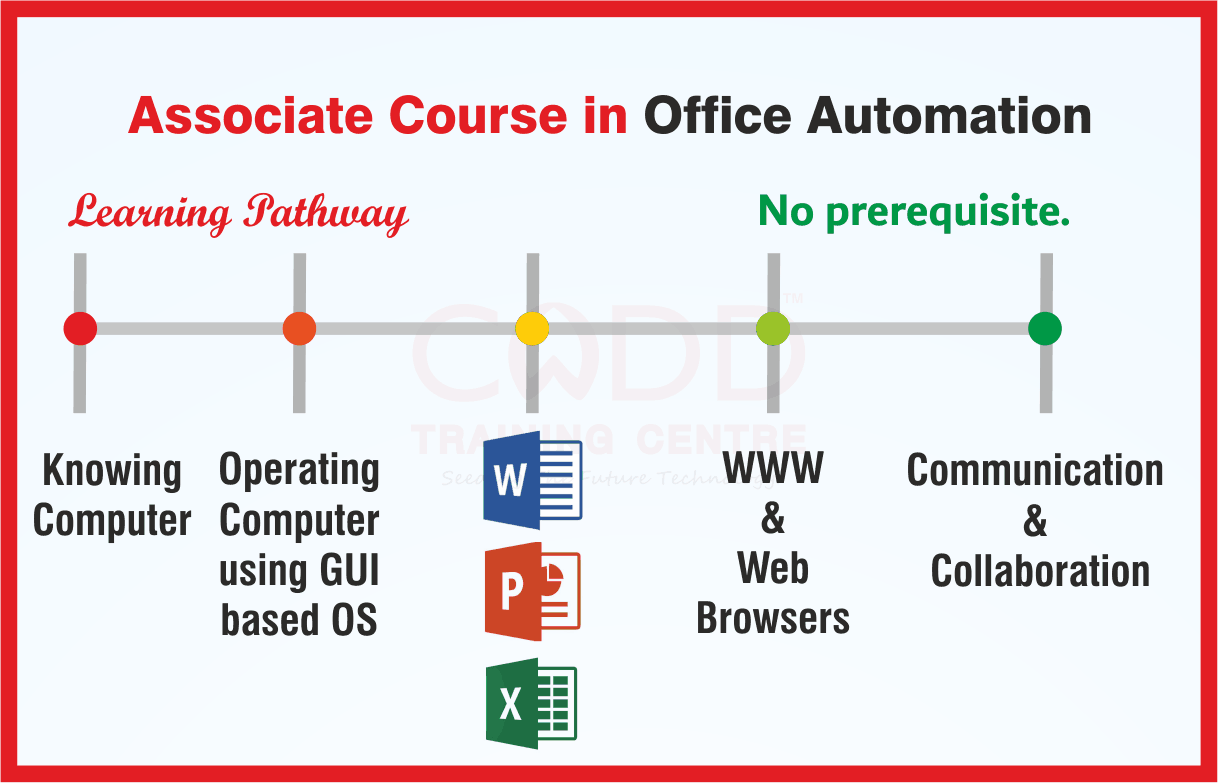 Office Automation Associate
 C Language
 C++ Language
 Java Core
 Java Advance
 Python
 HTML
 CSS
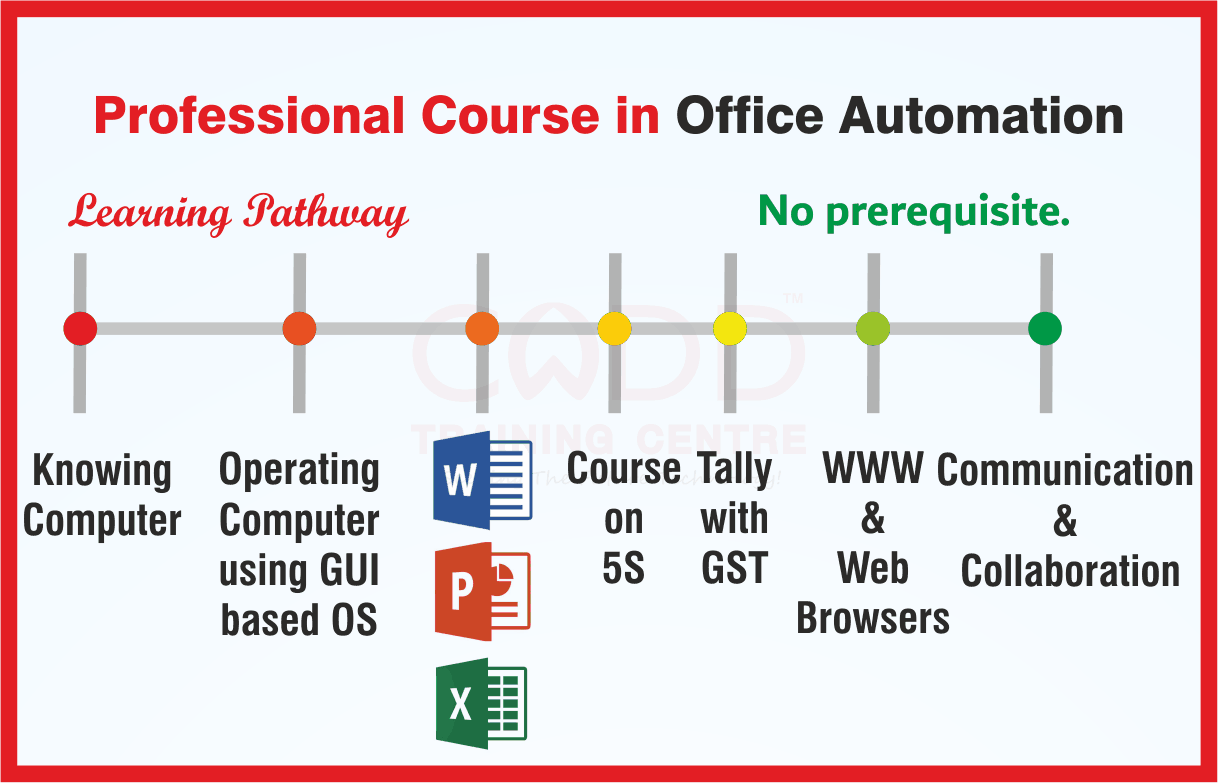 Office Automation Professional
 A Level
 B Level
 C Level
 Microsoft Project
 Power BI
 Figma
 AutoLISP & CAD Automation
