Classroom & live online 16 Hours Verifiable certificate Syllabus ↓

Nudi Typing Course

Learn Kannada typing in Nudi: keyboard layout, vowel signs, ottakshara, speed practice and office documents.

Your roadmap — from admission to certificate

  1. Free counselling

    Talk to our counsellor — choose the right course, batch time and mode.

  2. Admission

    Join at a CADD centre near you or online. You get your student login and ID card.

  3. Learn step by step

    16 Hours of hands-on Nudi Typing classes — in the classroom or live online.

    Introduction to NudiKannada Keyboard LayoutOttakshara and Word PracticeSpeed and Office DocumentsFonts, Unicode and Final Test
  4. Practice & project

    Exercises in every class and a final project, checked by your trainer.

  5. Course completion certificate + completion badge

    Finish the course and get your course-completion certificate and a digital completion badge with your name.
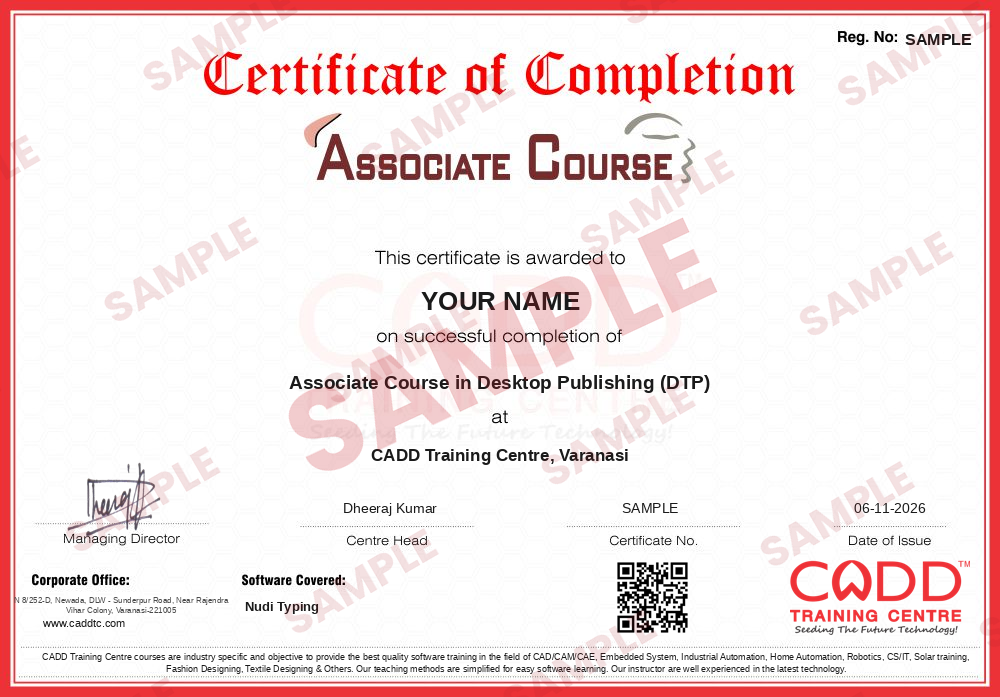

    Sample course-completion certificate — Associate Course in Desktop Publishing (DTP)
    Course-completion certificate (sample) — Associate Course in Desktop Publishing (DTP) · verifiable online
    Course-completion badge — Associate Course in Desktop Publishing (DTP)
    Course-completion badge
    Course
    Associate Course in Desktop Publishing (DTP)
    Issued by
    CADD Training Cetre
    Training
    Classroom or live online
    How to earn
    Complete the course and its project
    With your name and year · its own verify link · “Add to profile” on LinkedIn
  6. Certification exam

    Take the certification exam: a theory test and a practical task — at the centre or online.

  7. Certified certificate + marksheet

    Pass the exam and get the certified certificate with your marksheet. Anyone can check it online with its QR code.

  8. Certified badge

    Your certified badge — add it to LinkedIn and share it anywhere; it opens its own verify page.

    Certified badge — Associate Course in Desktop Publishing (DTP)
    Certified badge
    Course
    Associate Course in Desktop Publishing (DTP)
    Issued by
    CADD Training Cetre
    Training
    Classroom or live online
    How to earn
    Pass the certification exam
    You also get
    Certified certificate + marksheet
    With your name and year · its own verify link · “Add to profile” on LinkedIn
  9. Make your CV & apply for jobs

    Make your CV in your student panel (Career → My CV) — your course, certificates and projects are added for you. Send it as a link with a preview picture, and apply to jobs and Hire Me requests from companies.

About the Nudi Typing course

Nudi is Kannada typing software widely used in Karnataka government offices, schools and businesses. It lets you type Kannada text in MS Word and other programs with a standard keyboard layout, so it is an everyday tool for clerks, typists, DTP and data entry operators and anyone who prepares letters, notices or records in Kannada.

This short 16-hour course takes you from installation to confident, accurate typing. You first install Nudi and its fonts, learn to switch between Kannada and English, and get familiar with home-row finger positions. You then practise vowels (swaragalu), consonants (vyanjanagalu), vowel signs (gunitakshara), numbers and punctuation on the keyboard, before moving to ottakshara, common words, names, addresses and dates. Timed tests build speed and accuracy, and you prepare and format Kannada letters, applications and tables in MS Word. The final part explains Nudi fonts, Unicode text and converting between font encodings, so your documents display correctly on other computers and in email. Practice runs in a CADD Training Centre classroom or in live online classes on a Windows PC with Nudi installed.

The course is useful for candidates preparing for Karnataka office and clerical posts that ask for Kannada computer typing. Learners can add MS Office skills next for wider office work.

You will be able to

  • Install Nudi and switch between Kannada and English typing
  • Type Kannada vowels, consonants and vowel signs on the Nudi keyboard layout
  • Type ottakshara (conjunct letters) and common word forms correctly
  • Improve Kannada typing speed and accuracy with timed practice
  • Prepare letters and documents in Kannada using MS Word
  • Understand Nudi fonts, Unicode and font conversion

Who it is for

  • Candidates preparing for Karnataka government office and clerk jobs
  • Data entry and DTP operators who work with Kannada text
  • Students and office staff who need to type in Kannada
  • Anyone who knows Kannada and wants to type it on a computer

What you need

  • Ability to read and write Kannada
  • Basic computer and keyboard skills
  • A Windows PC with Nudi installed for live online classes

Courses that include Nudi Typing

Associate Course in Desktop Publishing (DTP)Associate Course · 156 Hours · 3 software
Enquire →

Nudi Typing Syllabus

5 chapters · 21 topics
01 Introduction to Nudi 4 topics
  1. What Nudi is and where it is used
  2. Installing Nudi and its fonts
  3. Switching between Kannada and English
  4. Using Nudi with MS Word and other programs
02 Kannada Keyboard Layout 5 topics
  1. Home row and finger positions
  2. Vowels (swaragalu) on the keyboard
  3. Consonants (vyanjanagalu) on the keyboard
  4. Vowel signs (gunitakshara)
  5. Numbers and punctuation
03 Ottakshara and Word Practice 4 topics
  1. Typing ottakshara (conjunct letters)
  2. Common words and sentences
  3. Correcting frequent typing errors
  4. Typing names, addresses and dates
04 Speed and Office Documents 4 topics
  1. Timed typing tests for speed and accuracy
  2. Letters, notices and applications in Kannada
  3. Formatting Kannada documents in MS Word
  4. Tables and printing
05 Fonts, Unicode and Final Test 4 topics
  1. Nudi ASCII fonts and Unicode text
  2. Converting text between font encodings
  3. Sharing Kannada text in email and web
  4. Final typing test and review

Ratings & reviews

Students rate the course after they finish it — their ratings appear here.

Nudi Typing course — FAQ

What is Nudi software used for?

Nudi is a Kannada typing software widely used in Karnataka government offices and schools. It lets you type Kannada text in MS Word and other programs using a standard keyboard layout.

Who should learn Nudi Kannada typing?

Job seekers for Karnataka government and office posts, DTP and data entry operators, office staff and students who need to type Kannada documents should learn it.

How many hours is the Nudi typing course?

The Nudi typing course is 16 hours long, covering the keyboard layout, ottakshara, speed practice, office documents and Unicode basics.

Can I learn Kannada typing online?

Yes. You can join a classroom batch at a CADD Training Centre or live online classes. For online practice you need a Windows computer with Nudi installed.

Will I get a certificate for Nudi typing?

Yes. Completing Nudi typing earns a CADD Training Centre certificate, which Karnataka offices and employers can verify online using its QR code or verification code.

Is Kannada typing needed for government jobs in Karnataka?

Many Karnataka government office posts, such as typists and clerical roles, need Kannada computer typing skills. Check the specific job notification for its exact requirement.

How can I type ottakshara in Nudi?

Ottakshara are typed by combining consonants with a special key sequence on the Nudi layout. The course practises these combinations step by step until they become automatic.

What is the difference between Nudi and Unicode Kannada typing?

Older Nudi fonts use their own encoding, so text can look broken on other systems. Unicode text displays correctly everywhere. The course explains both and how to convert between them.

More questions? Ask our counsellor or read the general FAQ.

Nudi Typing16 Hours
Enquire now