Classroom & live online60 HoursVerifiable certificateSyllabus ↓
AutoCAD Mechanical Course
Learn AutoCAD Mechanical: standard parts, power commands, BOM, part lists and machine drawings.
Your roadmap — from admission to certificate
1
Free counselling
Talk to our counsellor — choose the right course, batch time and mode.
2
Admission
Join at a CADD centre near you or online. You get your student login and ID card.
3
Learn step by step
60 Hours of hands-on AutoCAD Mechanical classes — in the classroom or live online.
AutoCAD Mechanical EnvironmentCreating DesignsManaging and Using Content LibrariesAnnotations and DocumentationDesigning Assemblies with Layer GroupsDesigning Assemblies with StructureDocumenting Parts and AssembliesAnalysis and ValidationImplementing Preferences and StandardsInreroperability
4
Practice & project
Exercises in every class and a final project, checked by your trainer.
5
Course completion certificate + completion badge
Finish the course and get your course-completion certificate and a digital completion badge with your name.
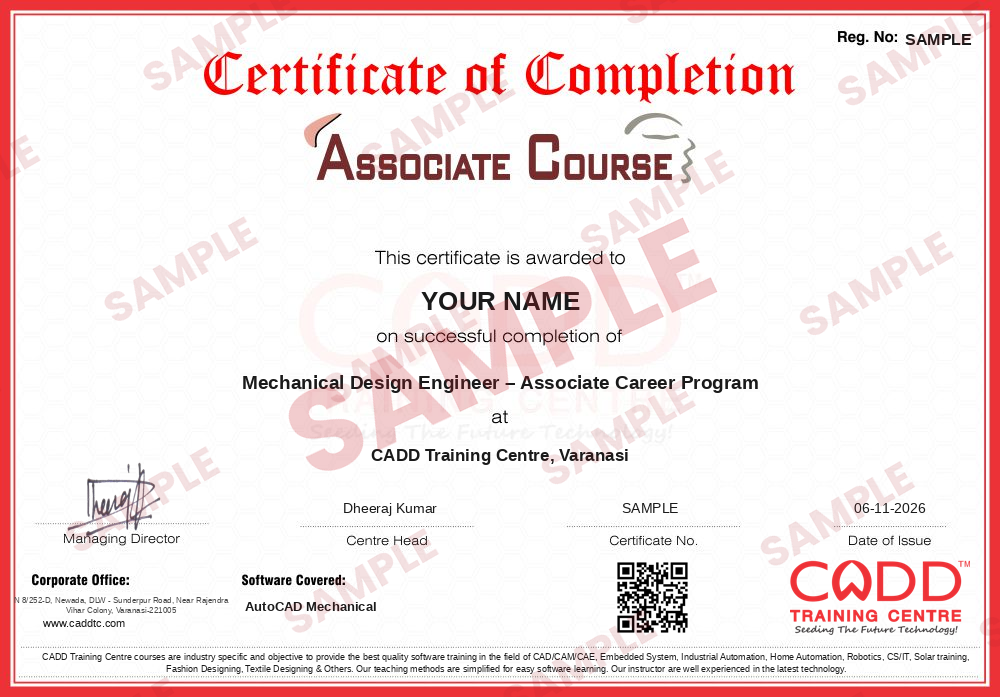
Course-completion certificate (sample) — Mechanical Design Engineer – Associate Career Program · verifiable online
Course-completion badge
Course
Mechanical Design Engineer – Associate Career Program
Issued by
CADD Training Cetre
Training
Classroom or live online
How to earn
Complete the course and its project
With your name and year · its own verify link · “Add to profile” on LinkedIn
6
Certification exam
Take the certification exam: a theory test and a practical task — at the centre or online.
7
Certified certificate + marksheet
Pass the exam and get the certified certificate with your marksheet. Anyone can check it online with its QR code.
8
Certified badge
Your certified badge — add it to LinkedIn and share it anywhere; it opens its own verify page.
Certified badge
Course
Mechanical Design Engineer – Associate Career Program
Issued by
CADD Training Cetre
Training
Classroom or live online
How to earn
Pass the certification exam
You also get
Certified certificate + marksheet
With your name and year · its own verify link · “Add to profile” on LinkedIn
9
Make your CV & apply for jobs
Make your CV in your student panel (Career → My CV) — your course, certificates and projects are added for you. Send it as a link with a preview picture, and apply to jobs and Hire Me requests from companies.
AutoCAD is well known CAD software widely used in mechanical, civil, electrical, and architecture trade. It is the best-selling product of Autodesk Inc. AutoCAD software is highly demanded in manufacturing concerns, industrial & architectural design, shipbuilding and other industries.AutoCAD Mechanical Trainingprogramis uniquely designed for the new AutoCAD Mechanical user who wants to learn all the concept of AutoCAD Mechanical. The training program covers the features, commands and techniques for creating and editing mechanical designs with AutoCAD Mechanical
Syllabus comming soon
You will be able to
Set up mechanical drawings using AutoCAD Mechanical templates, structure and drafting standards
Draw parts quickly with power commands, construction lines and mechanical layers
Insert standard parts such as bolts, nuts, washers, bearings and shafts from the content library
Generate balloons, parts lists and bills of materials linked to the drawing
Add machining symbols, surface texture, GD&T and fits and tolerances
Use calculators and generators for shafts, springs and chains
Prepare complete detail and assembly drawings for the shop floor
Who it is for
Mechanical, production and automobile engineering students
Mechanical diploma and ITI students (fitter, machinist, draughtsman)
Design and drafting staff working in manufacturing companies
AutoCAD users who want faster mechanical drafting
What you need
Basic AutoCAD 2D knowledge is recommended
Understanding of machine drawing basics such as views, sections and tolerances
For live online classes: a Windows PC with 8 GB RAM or more
Courses that include AutoCAD Mechanical
Mechanical Design Engineer – Associate Career ProgramAssociate Career Program · 160 Hours · 3 software
Students rate the course after they finish it — their ratings appear here.
AutoCAD Mechanical course — FAQ
What is AutoCAD Mechanical used for?
AutoCAD Mechanical is AutoCAD with an added toolset for mechanical design. It speeds up machine drawings with libraries of standard parts, automatic BOMs, balloons and mechanical annotation.
Who should learn AutoCAD Mechanical?
It is ideal for mechanical and production engineering students, diploma holders and drafting professionals in manufacturing. Some prior AutoCAD 2D practice makes learning smoother.
How many hours is the AutoCAD Mechanical course?
The AutoCAD Mechanical course is planned for 60 hours of guided practice on mechanical drawings, standard parts and assembly documentation.
Can I join AutoCAD Mechanical classes online?
Both are available. In live online AutoCAD Mechanical classes you prepare the same machine drawings and BOMs on your PC while the trainer checks them live, and classroom batches at CADD centres follow the same plan.
Is the AutoCAD Mechanical certificate verifiable?
Yes. AutoCAD Mechanical learners receive a CADD Training Centre certificate at the end. Show it to a manufacturing company, who can confirm it online through the QR code.
What is the difference between AutoCAD and AutoCAD Mechanical?
Plain AutoCAD is general-purpose drafting. AutoCAD Mechanical adds mechanical layers, standard part libraries, machining symbols, BOM and parts lists, which save a lot of time on manufacturing drawings.
What jobs need AutoCAD Mechanical skills?
Mechanical draughtsman, design engineer trainee, CAD technician and production drawing checker roles in manufacturing, fabrication and machine-building firms use these skills.